Clipboard History for Linux
This project is a lightweight clipboard listener daemon for Linux. I started the project because I was missing the Win+V shortcut when I switched to my Ubuntu and I was very used to using the feature. It is just more fun to make one of your own instead of downloading third-party clipboard manager.
The journey turned out to be quite interesting.
My first goal was to first understand how the clipboard works in Linux. I came across by-far the most interesting thing and that is the middle mouse button paste. I was shocked by the existence of this feature. If you still didn’t get it, you can select a piece of text and press the middle mouse button in any other text box, and BOOOM!!!
My first thought was to store the clipboard data in a DB. But then I thought about what a clipboard actually contains. Passwords. API keys. SSH commands. Access tokens. Personal messages.
Storing all of that on disk seemed like a bad security decision. So I decided to use RAM to store the history so the lifetime is limited to restarts. I used a fixed-size circular ring buffer with a hard limit of 50 entries.
The second question was IPC. There are many ways to do this on Linux. I chose UNIX Domain Sockets using AF_UNIX. The socket is created with restrictive permissions 0600. So it is not treated like a public service.
I followed a daemon/client model. The daemons job is to keep the clipboard alive and the client can ask the daemon to do something using its APIs. For example:
$ clipboard list
$ clipboard get 3
$ clipboard paste 3
$ clipboard clear
The final architecture
After the first round of design, the system looked like this:
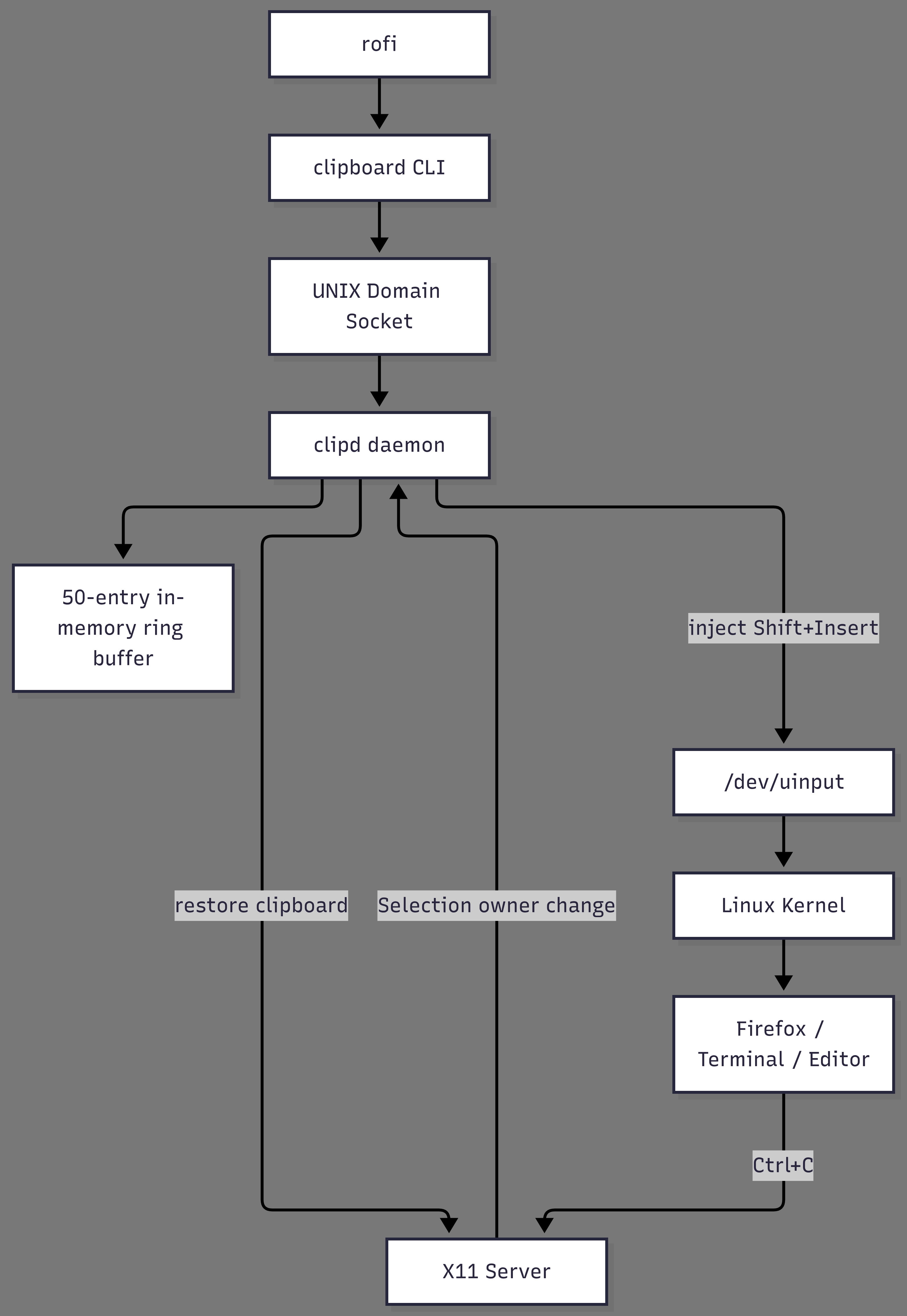
Here, rofi is a quick simple gui pop-up tool that I used to spawn a pop-up to select the text from the history that needs to be pasted.
Next
Now let me dive deeper into the technicalities and my learnings. (Big DUMP incoming!!!)